Most Gemini demos show dramatic one-shot tasks. Real workdays are quieter. They are full of short, repeated jobs that still benefit from a capable model if the workflow is designed correctly. This post walks through a typical day at a Bay Area AI startup and shows the exact places where Gemini earns its place without becoming a distraction.
The examples below are drawn from my own calendar and tool stack. Model choices, prompt patterns, and failure points are included so you can adapt the same patterns rather than copy the surface details. I have used variations of these workflows for several months. The ones that survived are the ones that respect the limits of both the model and my own attention.
Morning: Inbox and Priority Triage
The first useful call of the day is almost never a long generation. It is a triage pass over overnight messages and tickets. I paste a cleaned list of subject lines and short previews into Gemini Flash and ask for three buckets: needs human reply today, can wait 24 hours, and can be closed or delegated.
The prompt is deliberately constrained. It asks only for categorization and a one-sentence reason. Free-form rewriting is forbidden. That constraint keeps the output short enough to scan in under a minute and reduces the chance the model invents urgency that is not present in the source text.
I keep a short personal evaluation set of past triage results so I can spot when the model starts drifting. If the accuracy drops, I either tighten the prompt or switch to a different Flash variant. The whole loop takes less time than reading every message myself.
Mid-Morning: Meeting Note Compression
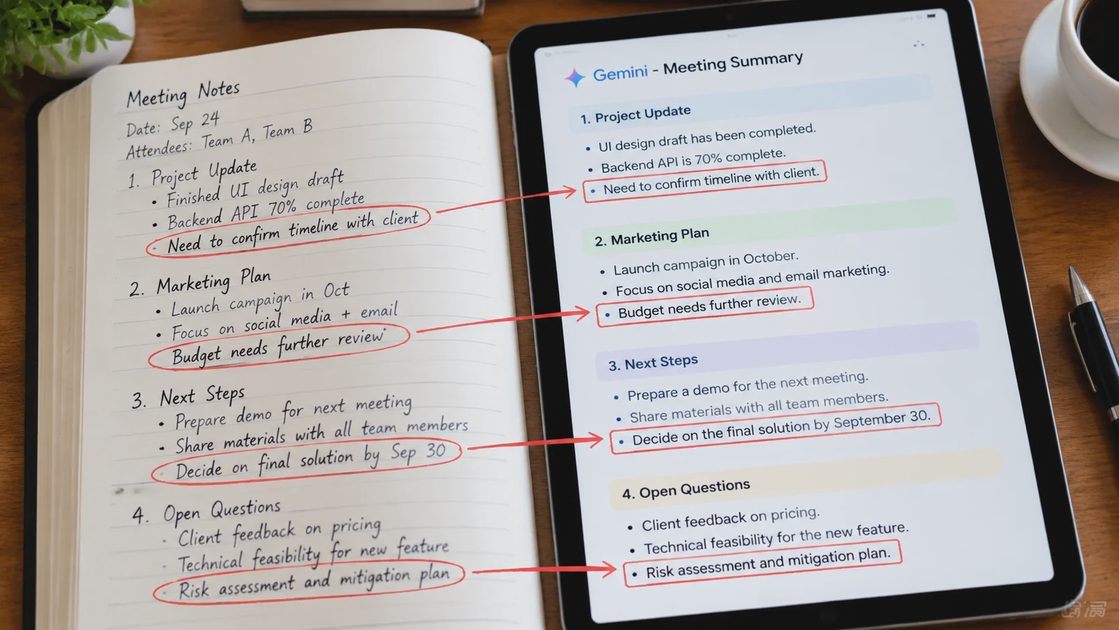
After stand-ups and customer calls I often have long transcripts. Gemini is useful here, but only after I strip the transcript down to the parts that matter. I remove filler, speaker labels when they add no signal, and any confidential pricing or personal details that should never leave the internal system.
The request is always the same shape:
Extract decisions and open questions
List action items with owners if mentioned
Flag any unresolved disagreements
Keep the output under 300 words
I never ask the model to invent next steps that were not discussed. That single rule prevents the most common failure mode I have seen in meeting-summary tools.
Afternoon: Drafting Internal Updates
Status updates and short internal briefs are a good fit for a two-step Gemini workflow. First I write a rough bullet outline myself. Then I ask Gemini to turn the outline into clean prose while preserving every factual claim. The model is not allowed to add metrics or conclusions that do not appear in the outline.
This pattern is slower than pure generation, but it keeps ownership of the facts with me. The model handles sentence flow and consistency. I handle truth.
Task type | Model preference | Human step that stays mandatory |
|---|---|---|
Inbox triage | Flash | Final priority judgment |
Meeting compression | Flash or Pro | Removal of confidential content |
Internal update draft | Flash | Fact ownership and final edit |
Code explanation | Pro | Verification against actual code |
Late Day: Light Research and Comparison
When I need a quick comparison of two technical approaches I sometimes use Gemini as a structured research assistant. I provide the two options, the constraints that matter for our stack, and a request for a side-by-side table of trade-offs. I treat the output as a starting draft, not as an authority. Every claim that influences a decision is checked against primary documentation or a short local experiment.
This use case is the one most likely to produce confident-sounding errors. The mitigation is simple: never let the model’s summary become the final record. The final record is the checked version. I also keep a personal rule that any research output used in a decision document must include the date of the Gemini call and the model identifier. That small habit makes it easier to revisit the source when the underlying facts change.
What Stays Human
Three categories of work still stay entirely human in my day:
Final decisions that affect customers or revenue
Any text that will be published externally under my name or the company’s name
Evaluation of whether a Gemini workflow is still worth the cost and attention
Gemini is a tool for reducing the cost of intermediate steps. It is not a replacement for judgment about what should be done in the first place. The most useful question I ask at the end of the day is not “How much did Gemini help?” but “Which steps still required my full attention, and is that the right allocation?”
I tried it first. The patterns above are the ones that survived more than a month of real use. You can adapt the same constraints to your own calendar without adopting my exact prompts. The value is in the boundaries, not in the specific wording of any single prompt.