

Function calling turns Gemini from a text generator into a system that can request specific actions. The feature is powerful and easy to misuse. This post shows a minimal, reliable pattern for adding function calling to a small Python application: define tools clearly, let the model propose calls, validate every argument, execute only after validation, and return structured results.
I use this pattern for internal tools that need to look up data or trigger side effects. The emphasis is on control, not on letting the model improvise. The most common failure I see in early function-calling implementations is trusting the model’s arguments without a validation layer. That trust is almost always repaid with unexpected side effects or silent data errors.
Define Tools with Explicit Schemas
Every tool is described with a name, a short description, and a JSON schema for its parameters. The schema is the contract. I keep the number of tools small (usually under five) and the descriptions precise so the model has less room to guess.
Example tool definition for a simple status lookup:
tools = [
    {
        "name": "get_ticket_status",
        "description": "Return the current status of a support ticket by ID",
        "parameters": {
            "type": "object",
            "properties": {
                "ticket_id": {"type": "string", "description": "The ticket identifier"}
            },
            "required": ["ticket_id"]
        }
    }
]
The Call Loop
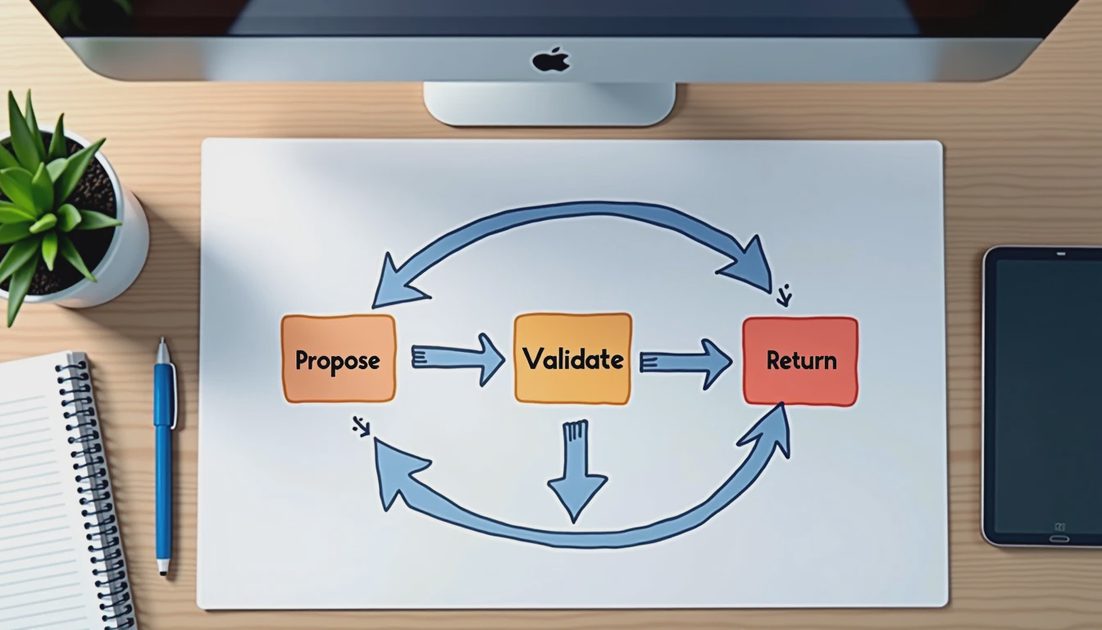
The basic loop is:
Send the user request plus the tool definitions to Gemini.
If the model returns a function call, validate the arguments against the schema.
If validation passes, execute the function and return the result to the model.
If validation fails, return a structured error and let the model try again or explain.
Repeat until the model produces a final text answer or a maximum step count is reached.
I always enforce a maximum number of steps (usually three to five). Unbounded loops are a reliability risk. I also log every proposed call, whether it was validated, and whether it was executed. Those logs are the fastest way to spot systematic problems such as a tool that is never chosen or a tool that is chosen with the wrong arguments.
When the model produces a final text answer I still check whether any tool calls remain pending. A clean termination condition prevents the loop from exiting while work is incomplete.
Validation Before Execution
Never execute a tool call based solely on the model’s output. Validate:
The tool name exists
All required parameters are present
Parameter types match the schema
Values fall inside any documented ranges or formats
If any check fails, return a clear error message to the model instead of raising an exception that crashes the process. The model can often recover when given a precise error. I format the error as a short JSON object that includes the field name and the reason, so the model has something concrete to correct.
This validation layer is also the natural place to enforce business rules that the schema cannot express, such as “ticket_id must belong to the current user” or “amount must be positive.” Keeping those rules in application code rather than in the prompt makes them testable and auditable.
Step | Responsibility | Failure handling |
|---|---|---|
Propose call | Model | N/A |
Validate arguments | Application code | Return structured error to model |
Execute tool | Application code | Catch and return safe error |
Incorporate result | Model | Continue or final answer |
What Worked / What Failed / What I Would Change
What worked
Keeping the tool list short and the schemas strict. Validating before every execution. Limiting the number of steps. Returning structured errors to the model so it can recover instead of crashing the process.
What failed
Early versions that trusted the model’s parameter types without checking. Also, prompts that encouraged the model to call tools “when helpful” without clear boundaries produced unnecessary calls. One early prototype allowed the model to invent tool names; the validation layer caught it, but the prompt had to be tightened.
What I would change in production
I would add per-tool rate limits and audit logging of every executed call. I would also experiment with a cheap classifier that decides whether a request even needs tools before invoking the full function-calling loop. Finally, I would store the tool schemas in a versioned configuration so that changes to tools can be reviewed like any other code change.
Even with strict schemas, your application is only as good as the underlying models. If you're building systems that require deep reasoning, it's worth keeping an eye on where the foundational models are heading. I recently broke down what to expect from Google's rumored next flagship image model, which hints at the direction of the Gemini 4 architecture and its multimodal capabilities.
I tried it first. You can adapt the same validate-then-execute loop to your own tools. The demo is easy. Keeping the model from calling the wrong function with the wrong arguments is the real work. Once the pattern is in place, adding a new tool becomes a matter of writing a schema and a small handler function.
I also log the rate at which tool calls are rejected by validation. A rising rejection rate is often an early signal that the prompt or the tool descriptions need tightening. Treating validation failures as a product metric rather than just an error path makes the system easier to improve over time.
Finally, keep the tool list short. Every additional tool increases the chance of an incorrect call. Prefer a small set of well-described tools over a large set of vaguely described ones. Clarity in the tool definitions pays for itself in fewer validation failures and fewer unexpected side effects.