Bottom line first.
Google released Gemini 4 Hydrogen on November 12, 2026 (U.S. time) and positioned it as the everyday workhorse for agentic workflows—the kind of tasks where the model breaks a job into steps, calls tools, and finishes the work. Higher-tier models in the same family (Argon and Carbon) stay focused on hard, long-horizon reasoning. Hydrogen is the fast, lower-cost option for day-to-day coding and agent loops.
Who can use it and where:
Gemini app — free users can get Hydrogen in Auto mode when the system routes to it; paid users can select it directly
Google Search — available to users globally
Google AI Studio & Gemini API — free tier available (free-tier data may be used to improve products; paid tier does not)
Antigravity — requires Google AI Pro or Ultra
Google Sheets — rolling out first to Pro and Ultra subscribers
The model accepts text, image, audio, video, and PDF (and spreadsheet) input and uses a unified 1,048,576-token context window. Official API pricing is $1.50 per 1M input tokens and $7.50 per 1M output tokens.
For developers the useful questions are practical: how do you call it, what changed from 3.8 Flash, and what does a reliable tool-using agent look like? That is what the rest of this note covers.
API model ID and minimal call
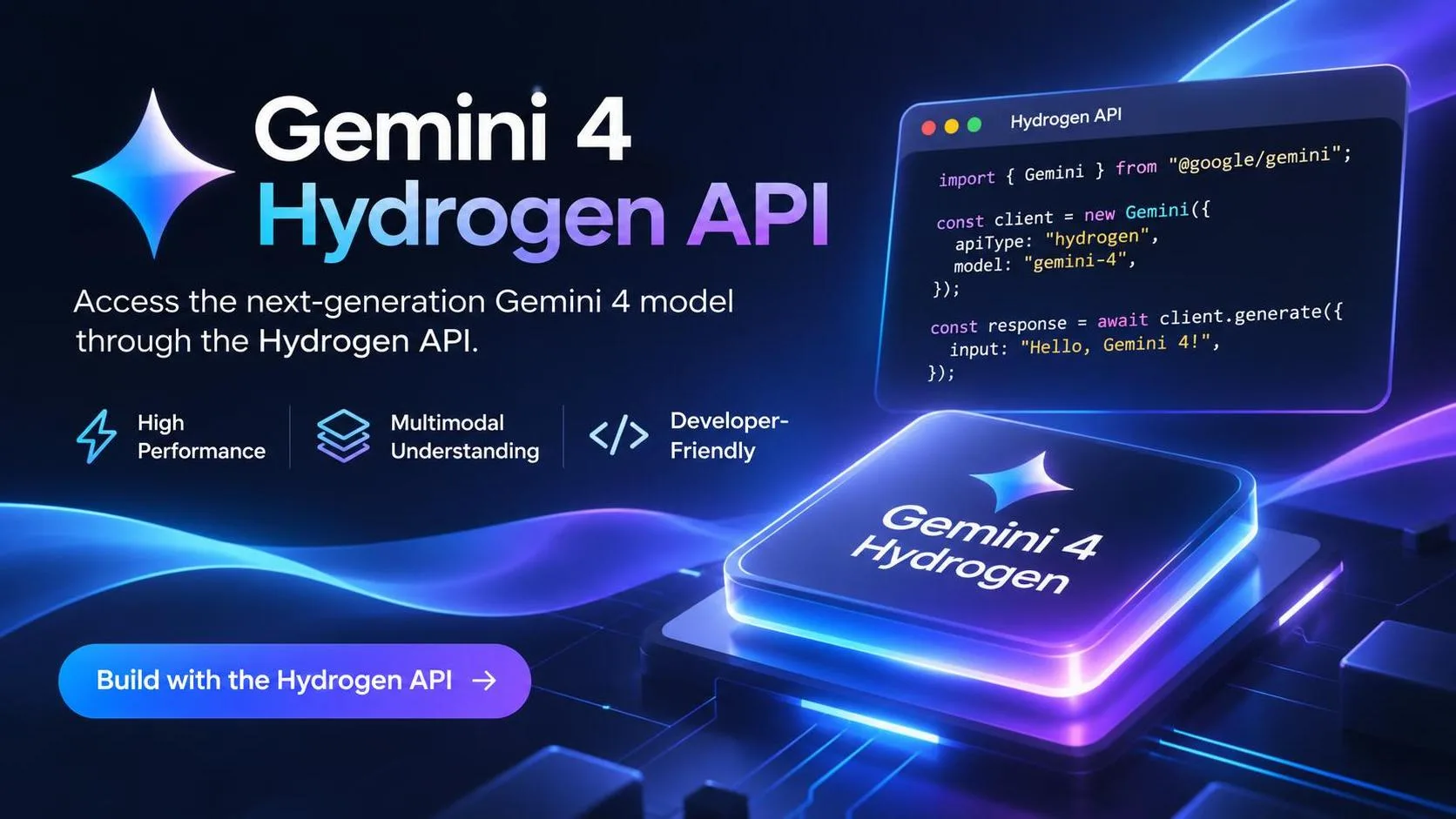
Model ID: gemini-4-hydrogen
Python
from google import genai

client = genai.Client()  # or genai.Client(api_key="...")

interaction = client.interactions.create(
    model="gemini-4-hydrogen",
    input="Build an interactive single-file HTML token bucket rate-limiter simulator with live sliders for burst size and request traffic."
)

print(interaction.output_text)
Default behavior uses thinking level high and a 65,536-token synchronous output limit. That is enough for most everyday coding tasks.
Install / upgrade the SDK before you start:
Bash
pip install --upgrade "google-genai>=2.34.0"(Pin a newer release if your environment requires it; the important part is a version that knows the Hydrogen model enum and the xhigh thinking level.)
Thinking levels — the control that actually matters
Hydrogen supports four levels: low, medium, high (default), and xhigh.
Level | Behavior | When to use |
|---|---|---|
low | Fewest tokens, lowest latency | High-throughput or cost-sensitive work |
medium | Faster, lighter | Interactive coding, live UI, responsive tools |
high | Balanced (default) | Most coding and agentic / multi-step tool loops |
xhigh | Deepest reasoning, highest cost | Hard multi-step problems where high falls short |
Start at high. Only move to xhigh when your own evaluation set shows a clear quality gap. Do not send thinking_level="minimal" or a separate thinking_budget — those return errors. Custom temperature, top_p, and top_k are ignored or rejected; remove them from existing clients.
Python
interaction = client.interactions.create(
    model="gemini-4-hydrogen",
    input="Audit this payment retry queue for race conditions and rewrite the lock acquisition logic.",
    generation_config={
        "thinking_level": "xhigh"
    }
)
Unified 1M context and long decode
Input, thinking, and output tokens share one 1,048,576-token window. Synchronous responses still default to a 65,536-token cap. To go longer:
Raise
max_output_tokens(up to the remaining context)Set
background=Trueso the server continues in 64K hops, orUse client-side continuation in the latest SDKs
If you only set background=True without raising max_output_tokens, generation still stops at 65,536 tokens.
A practical agent pattern (tools + verification)
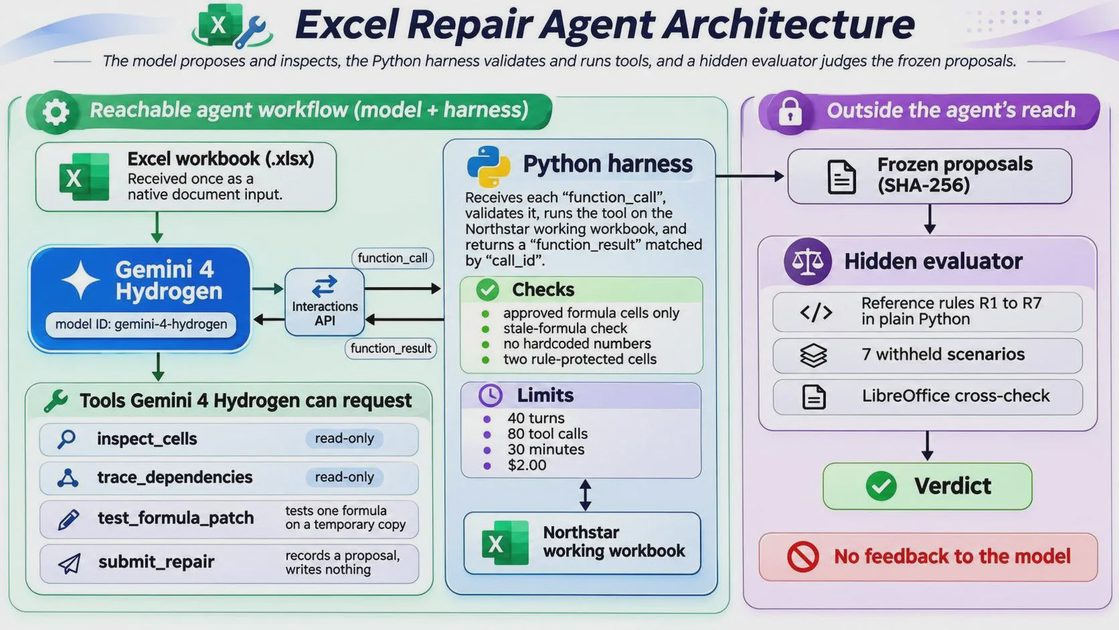
Hydrogen is strongest when you keep the model in the investigation/proposal role and keep exact reads, writes, and scoring in Python. A clean pattern looks like this:
Give the model a clear system instruction and a small set of declared tools
Let it choose what to inspect
Run the tools yourself
Only accept changes that pass your own tests
Example tool surface for a spreadsheet-repair style agent:
inspect_cells— return exact formulas, cached values, and formats for a bounded rangetrace_dependencies— list cells a formula reads and cells that depend on ittest_formula_patch— apply a candidate change on a temporary copy and reject new calculation errorssubmit_repair— record a candidate that already cleared the safety checks (without writing the production file)
Sketch of the request shape:
Python
from google import genai

client = genai.Client(api_key=load_api_key())

request = dict(
    model="gemini-4-hydrogen",
    system_instruction=SYSTEM_INSTRUCTION,
    tools=TOOL_DECLARATIONS,  # native function declarations
    generation_config={"thinking_level": "high"},
)

# First turn can include a document block (e.g. base64 .xlsx)
# Subsequent turns feed tool results back until the model submits repairs
Important limitation on spreadsheets: when you pass an .xlsx as a document, the model often sees values more reliably than live formulas, and multi-sheet behavior is not fully transparent from the API side. Treat the upload as context, not as a perfect formula dump. Exact cell reads and recalculation should stay in your Python tools.
In one controlled workbook experiment (three silent formula errors, two intentional exceptions, hidden verification scenarios), a Hydrogen agent using this pattern found the real errors, left the exceptions alone, and produced repairs that survived input changes.
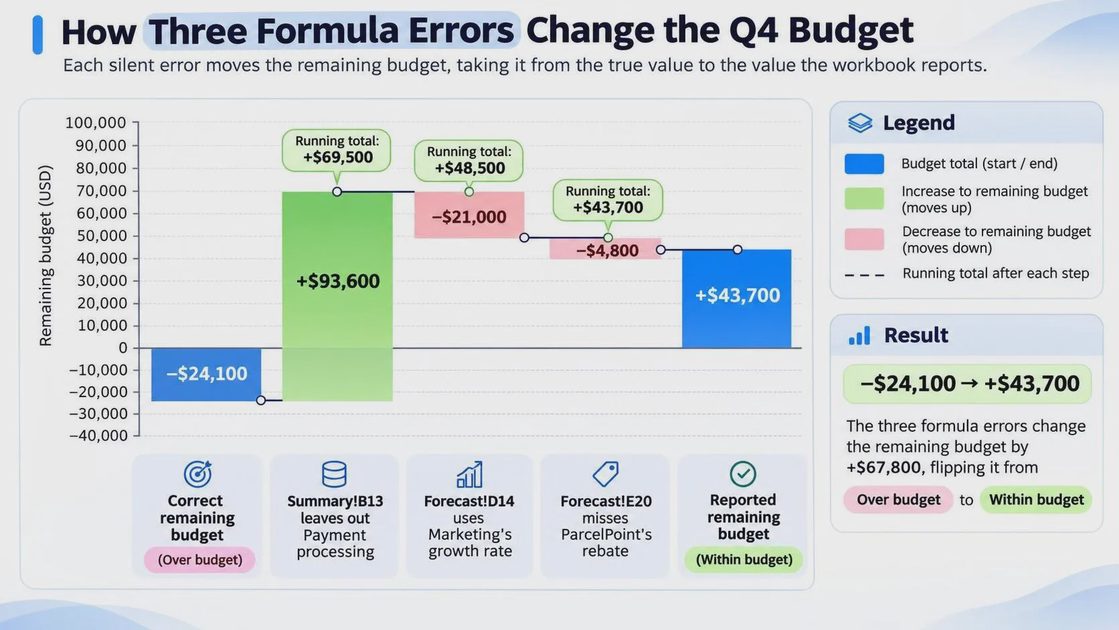
Estimated cost for that run was on the order of $0.20 at paid standard rates. Treat that as a case study, not a universal accuracy claim—your domain will differ.
Migration checklist from Gemini 3.8 Flash
Change the model string to
gemini-4-hydrogenRemove low
max_output_tokenshard-codes or raise them to at least 65,536Expect default thinking level
high(notmedium);minimalis rejectedRemove explicit context-caching fields — not supported (implicit caching still applies on prompts ≥ 4,096 tokens)
Drop
temperature,top_p, andtop_kDeclare tools natively or use structured outputs; do not prompt the model to invent raw-text JSON tool calls
Preserve thought signatures across multi-turn and tool-calling sessions
Hydrogen is designed to sit alongside Carbon and Argon without request-schema changes, so multi-model routing is mostly configuration.
What the official notes claim (and what to verify yourself)
Google states that Hydrogen:
Writes cleaner code and cuts fabricated claims by more than 5× versus 3.8 Flash by flagging missing context instead of guessing
Batches read/search tool calls in parallel and recovers more cleanly when a tool call fails
Improves multimodal handling of tables, charts, dense PDFs, images, audio, and video
Serves as the default model for the Antigravity agent
Those are useful signals. The numbers that matter for your stack are still the ones you measure: wall-clock latency, token use at each thinking level, and tool-call success rate on your own evaluation set.
Practical recommendation
Use Hydrogen as the default for everyday coding agents, interactive tools, and parallel sub-agent work
Keep exact verification, file writes, and scoring in your own harness
Route the hardest architecture, security, or long-horizon reasoning tasks to Carbon or Argon
Log latency and token cost at
medium,high, andxhighbefore locking a default
Hydrogen is the model I reach for first when the job is “get the agent loop working reliably and quickly.” For the cases where speed is not enough, the higher-tier models are still there.
I tried it first. You can just copy.