“I tried it first. You can just copy.”
Have you ever looked at a messy wall of LLM-generated JSON, wondering why a simple “Yes or No” check or policy compliance classification requires paying for thousands of verbose output tokens?
What if a multimodal model could ingest a massive document, an hour of meeting audio, or a product screenshot, evaluate up to 1,000 structured questions simultaneously, and return mathematically calibrated probabilities in a single pass—without generating a single word of text or costing a cent in output tokens?
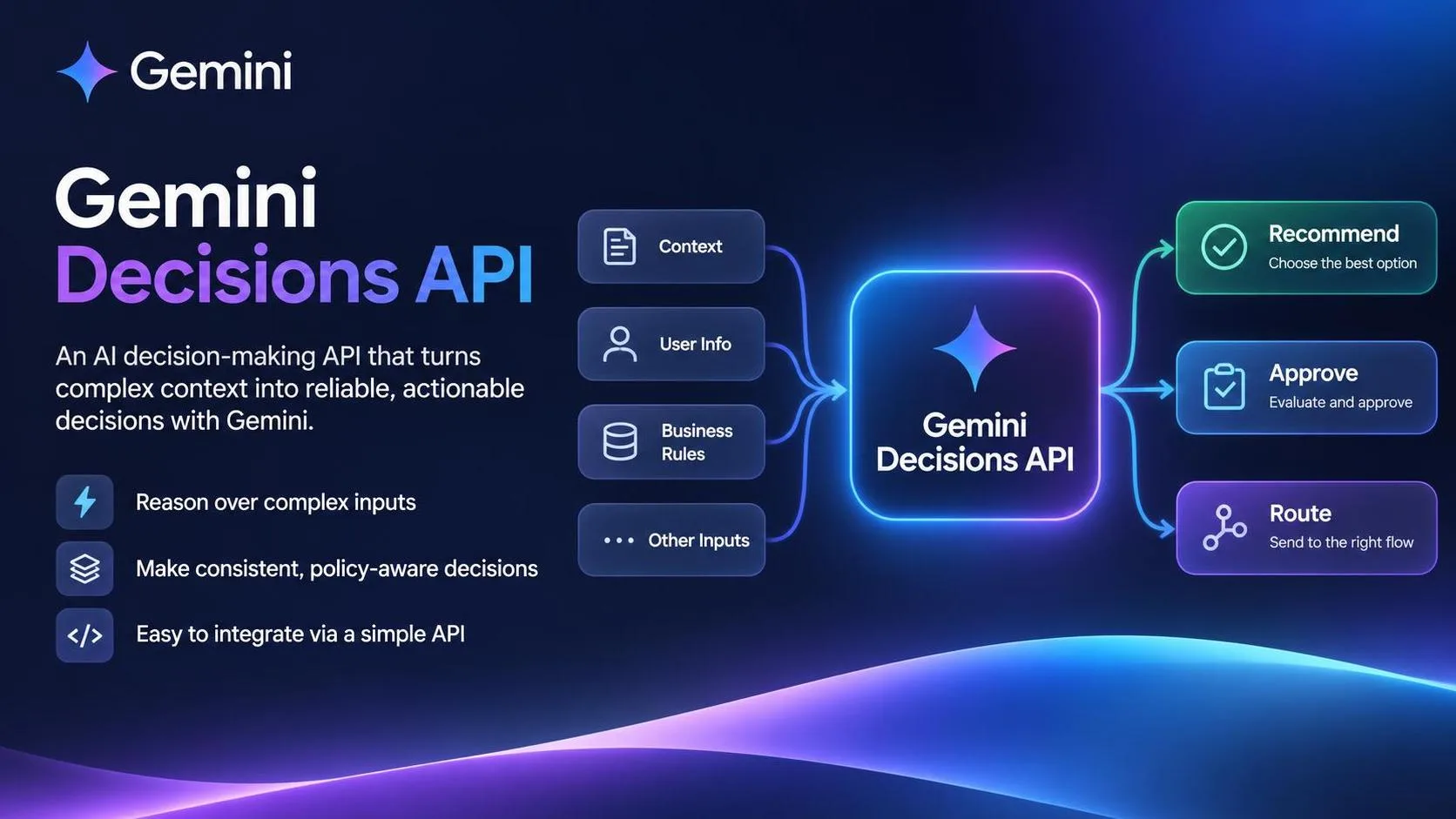
That isn’t a theoretical prompt hack. It is the exact premise behind Google’s newly released Gemini Decisions API, powered by the specialized Gemini Decision 1 (gemini-decision-1) model.
After getting early access in Google AI Studio, I spun up a clean test project locally to put it through real engineering workflows. Here are my field notes, architectural takeaways, and a minimal working Python implementation.
Table of Contents
Core Mechanism: How the Gemini Decisions API Differs from Generative LLMs
Key Specifications: 1,000 Questions, 262K Context, and Zero Output Tokens
Quickstart: Calling the Decisions API in Python
Field Notes: Where It Excels and Where Its Boundaries Lie
Summary: What Worked / What Failed / Production Takeaways
1. Core Mechanism: How the Gemini Decisions API Differs from Generative LLMs
Traditional LLMs are generative—they predict and stream text or JSON one token at a time. The Gemini Decisions API flips that paradigm entirely:
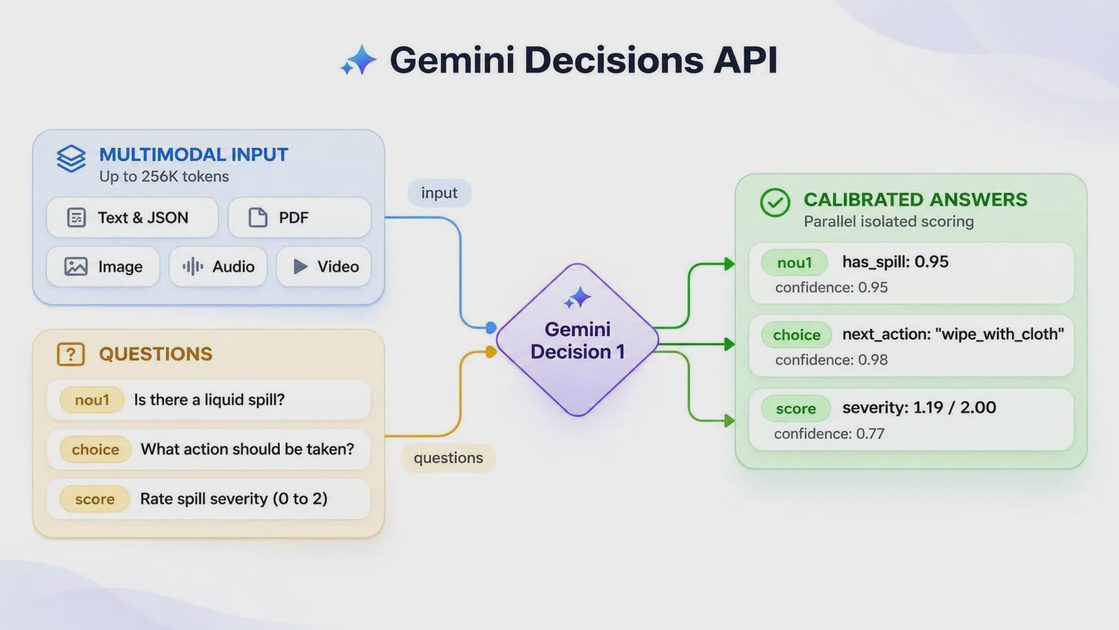
Zero Output Tokens: After running a single prefill pass over your shared input context, the model directly evaluates your structured questions and returns calibrated probabilities. Output token consumption is literally zero.
Native Typed Questions:
Yes/No Questions: Returns a boolean outcome alongside a confidence score.
Single-Select Questions: Evaluates between 2 and 255 discrete options, returning probabilities and confidence levels for each choice.
Rubric Rating Questions: Scores inputs across an ordered scale of 2 to 255 levels, returning probability-weighted expected scores.
Engineering Takeaway: This design directly targets tool selection, policy compliance checks, dynamic model routing, and context grading. You no longer have to write brittle regex parsers or retry loops just to extract a reliable classification from a wall of generated text.
2. Key Specifications: 1,000 Questions, 262K Context, and Zero Output Tokens
Before diving into the code, here are the core technical parameters for gemini-decision-1:
Context Window: Up to 262,144 tokens (covering both the shared input payload and all evaluation questions).
Single-Request Capacity: Evaluates up to 1,000 independent decision questions in a single API call.
Multimodal Inputs: Natively processes text, images, audio, and video inputs within the shared context.
Pricing & Access: Developers can generate an API key via Google AI Studio with a free tier available for prototyping. On paid usage in Google AI Studio, input tokens are priced at $0.10 per 1 million tokens, while output tokens are permanently free ($0).
3. Quickstart: Calling the Decisions API in Python
“Here’s the smallest version that works.”
You can call gemini-decision-1 via Google AI Studio using the official google-genai SDK.
Step 1: Install the SDK and Export Your API Key
Make sure you are running the latest version of the SDK and store your API key securely as an environment variable:
pip install -U google-genai
export GEMINI_API_KEY="your_actual_api_key_here"
Step 2: Minimal Working Example
Below is a clean Python example showing how to pass a shared document context and evaluate multiple structured questions against gemini-decision-1:
import os
from google import genai
from google.genai import types

# Initialize the client (automatically reads GEMINI_API_KEY from environment)
client = genai.Client()

def evaluate_document_decisions():
    # 1. Define the shared input context (e.g., SaaS terms or policy text)
    document_context = (
        "Service Level Agreement: 99.9% uptime guaranteed for Enterprise tiers. "
        "Data retention period is set to 30 days post-termination. "
        "Support response time is within 4 hours for critical incidents."
    )

    # 2. Evaluate structured questions (Yes/No, Single-Select, Rubric Rating)
    print("Evaluating document criteria using Gemini Decision 1...")

    response = client.models.generate_content(
        model="gemini-decision-1",
        contents=[
            document_context,
            (
                "Evaluate the following questions based on the text above: "
                "1. Is the uptime guarantee 99.9%? (Yes/No) "
                "2. What is the data retention period? Options: [7 days, 30 days, 90 days] "
                "3. Rate the support responsiveness severity scale from 1 to 3."
            )
        ],
    )

    print("--- Decision Results ---")
    print(response.text)

if __name__ == "__main__":
    evaluate_document_decisions()
(Note: If you want to test multimodal prompts interactively without writing code first, you can use the built-in Decisions Playground directly inside Google AI Studio.)
4. Field Notes: Where It Excels and Where Its Boundaries Lie
“The demo is easy. The edge cases are the real tutorial.”
After testing gemini-decision-1 on practical workflows like automated contract clause auditing and support audio compliance checks, three key engineering lessons stood out:
Built for high-density, parallel classification:When you need to audit a large PDF or a long video clip against hundreds of distinct criteria simultaneously, evaluating up to 1,000 questions in a single prefill pass keeps latency low and API bills minimal.
Not a replacement for generative text models:Because the model produces zero output tokens and returns probability distributions rather than prose, it does not support function calling, streaming text generation, copywriting, or code generation. If you ask it to summarize an article in paragraphs, you are using the wrong tool.
Question framing dictates probability calibration:Just like standard prompting, ambiguous evaluation criteria produce ambiguous probabilities (hovering around
0.5). Keep each question atomic and binary or clearly bounded, and apply confidence thresholds (e.g., routing anything below0.85confidence to human review) in production.
5. Summary: Production Takeaways
Following the Gemini Build Lab evaluation checklist, here is how gemini-decision-1 fits into a real production stack:
What worked:
Zero output token overhead (free output pricing) combined with a $0.10 / 1M input token rate makes high-volume multimodal tagging, moderation, and routing nearly negligible in cost.
Evaluating up to 1,000 independent questions in one call eliminates messy client-side batching loops.
What failed:
Cannot be used for open-ended generation, multi-turn chat, or tool-calling execution.
What I would change in production:
Deploy
gemini-decision-1as an upstream triage and compliance gateway. Use it to rapidly score, filter, and route incoming multimodal data at ultra-low cost, passing only qualified or complex edge cases downstream to full generative models like Gemini Flash or Pro.