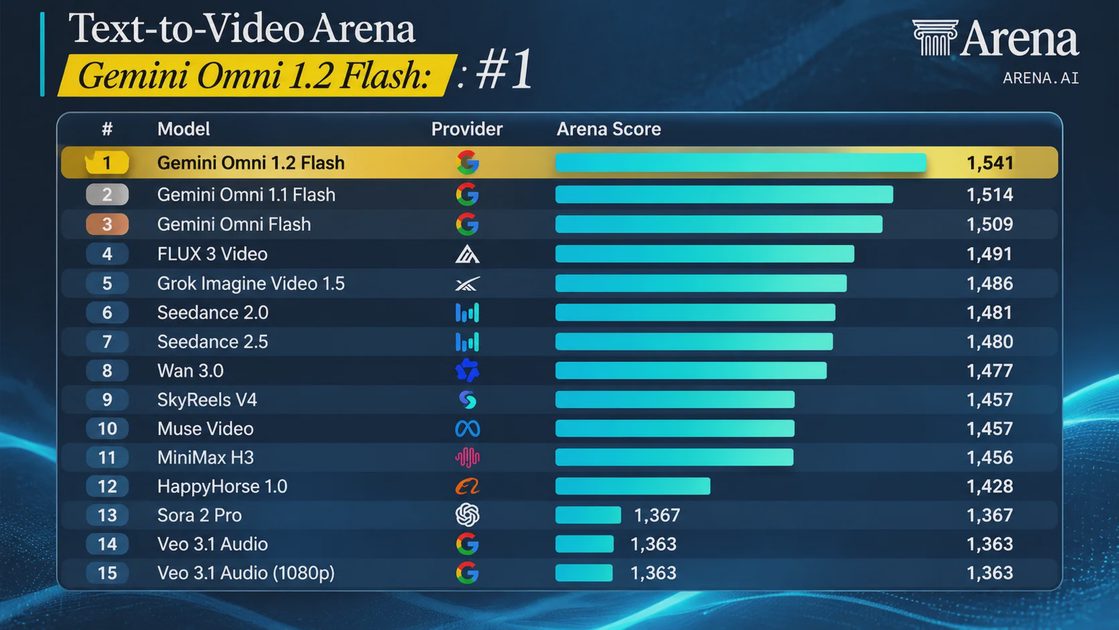
Gemini Omni 1.2 Flash just reached #1 on the Text-to-Video Arena leaderboard, and Google says it can now generate 15-second videos at 30% lower pricing. But here's the question I care about: can it keep the same person, product, and scene consistent long enough to make a video worth publishing?
That's more important to me than another first-place ranking.
Google's November 5 announcement introduces longer clips, conversational editing, improved camera control, and more natural speech. The supplied Arena snapshot puts Omni 1.2 Flash at 1,541 points, 27 points ahead of Omni 1.1 Flash.
My initial assessment is that Omni 1.2 Flash looks particularly promising for short product videos and social ads, but teams should test identity consistency, editing reliability, and cost per usable clip before making it their default generator.
ON THIS PAGE
What Gemini Omni 1.2 Flash Actually Changes
Does It Really Solve Video Consistency?
How Much Does a 15-Second Video Cost?
Can You Edit Videos Through Conversation?
The Nano Banana to Omni Workflow
What Google Still Needs to Improve
How I Would Evaluate It for Production
My Verdict
What Gemini Omni 1.2 Flash Actually Changes
Google announced Gemini Omni 1.2 Flash on November 5, 2026, with general availability through the Gemini API and Google Cloud.
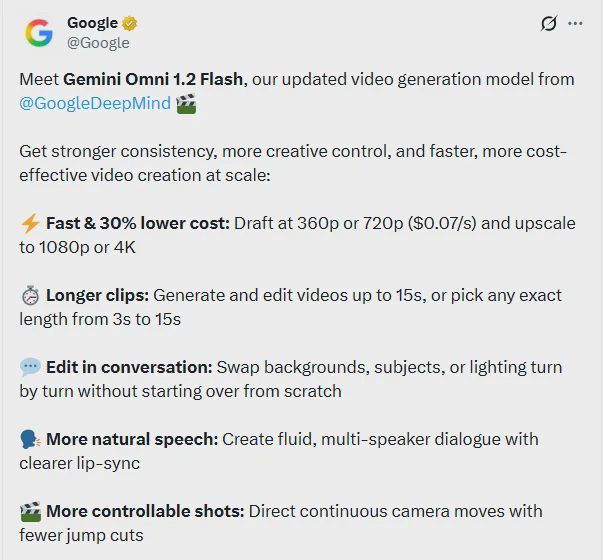
The headline improvements are practical rather than cosmetic.
Longer videos: Native generation and editing from 3 to 15 seconds.
Lower pricing: A reported 30% reduction compared with Omni 1.1 Flash.
Better reference adherence: Improved handling of character, product, and style references.
Conversational editing: Change elements of an existing video through follow-up instructions.
Camera control: More continuous camera movements with fewer unwanted cuts.
Speech improvements: More natural dialogue and clearer lip synchronization.
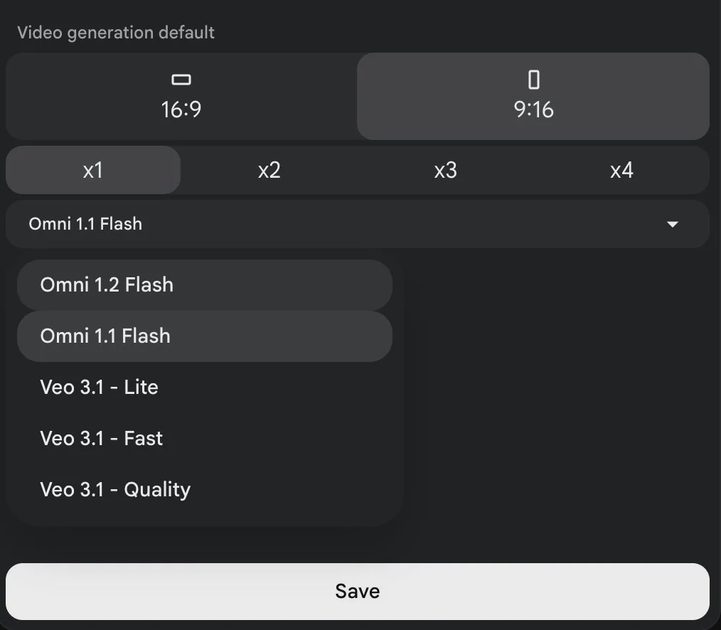
The Arena ranking adds another reason to pay attention.
In the supplied Text-to-Video Arena snapshot, Omni 1.2 Flash leads with 1,541 points. Omni 1.1 Flash follows at 1,514, while Gemini Omni Flash appears third at 1,509.
That means Google's Omni variants occupy the top three positions in that particular snapshot.
But rankings are dynamic, and Arena results reflect the evaluation conditions and preferences of the people participating.
Winning a preference leaderboard doesn't prove that a model will preserve your product packaging or character identity across every generation.
Those are separate questions worth testing.
Does It Really Solve Video Consistency?
This is the improvement I'm most interested in.
One of the most frustrating problems with AI-generated video is visual drift: a character's face changes, a product logo becomes distorted, or an object gradually transforms during a camera movement.
Google says Omni 1.2 Flash improves reference adherence and reduces these problems across longer clips.
Its official examples include product details, camera transitions, and multi-shot sequences.
That's encouraging, but I'd separate three kinds of consistency.
Consistency Type | What It Means | What Can Go Wrong |
|---|---|---|
Identity | A person or character remains recognizable. | Facial features change between shots. |
Object | Products and props retain their details. | Logos, colors, or shapes drift. |
Scene | Environment and lighting remain coherent. | Background objects appear or disappear. |
For a casual fantasy clip, a small background inconsistency may not matter.
For an ecommerce video, a product changing shape is a serious problem.
Imagine generating a 15-second advertisement for a pair of running shoes. The shoe looks correct in the opening frame, but its sole pattern changes halfway through a camera orbit.
That video might still look impressive. It isn't ready to publish.
Google's own announcement acknowledges remaining challenges involving fast action, rapid changes, and complex physics.
My interpretation is that the model has improved, not that visual consistency is a solved problem.
How Much Does a 15-Second Video Cost?
The pricing improvement is significant because short-form video production often involves multiple attempts.
Google's announced 720p price is $0.07 per second, and its intended workflow encourages drafting at lower resolutions before upscaling selected results.
Using the published resolution-specific rates, the approximate generation costs look like this:
Resolution | Approx. Cost/Second | 15-Second Clip |
|---|---|---|
360p draft | $0.023 | $0.35 |
720p | $0.070 | $1.05 |
1080p upscaled | $0.104 | $1.56 |
4K upscaled | $0.209 | $3.14 |
These are approximate generation charges based on published rates. Actual billing should be checked against the current API pricing documentation.
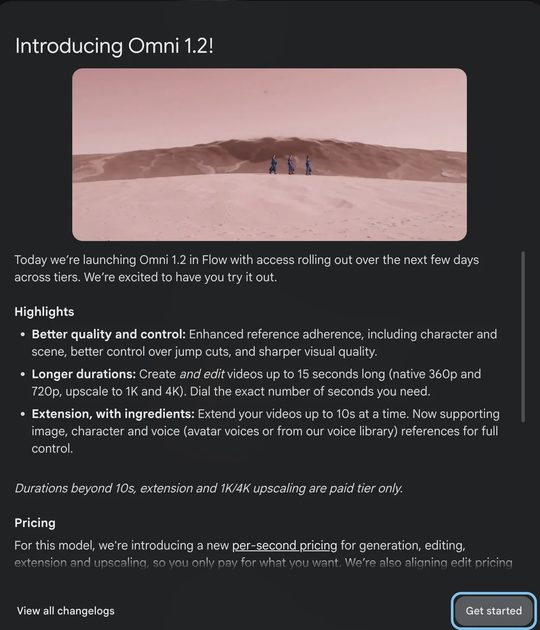
At first glance, $1.05 for a 15-second 720p video sounds inexpensive.
But that number only describes one generation.
The Cost of Getting One Usable Video
Suppose a team needs one approved 15-second product clip.
It generates five 720p candidates and only one passes review.
That's approximately $5.25 in generation charges before editing, upscaling, and human review.
Now imagine producing 100 approved videos with the same success rate.
The generation cost rises to approximately $525.
And that's before accounting for staff time, failed edits, asset preparation, and final quality assurance.
This is why I prefer measuring cost per accepted clip instead of cost per second.
A slightly more expensive model that consistently produces usable results could be cheaper than a lower-priced model requiring repeated attempts.
The 30% price reduction is welcome. Whether it translates into a 30% reduction in production spending remains unproven.
Can You Edit Videos Through Conversation?
Conversational editing may be the most important workflow improvement in Omni 1.2 Flash.
Instead of rebuilding a video whenever a creative director requests a change, users can provide follow-up instructions to modify an existing clip.
Google describes edits such as changing backgrounds, lighting, weather, products, and aspect ratios.
For marketing teams, that's potentially valuable.
Imagine creating a product video in a bright studio.
The first version looks good, but the campaign requires a warmer atmosphere.
Instead of starting again, the team could request:
Keep the product, camera movement, and timing unchanged. Replace the cool studio lighting with warm late-afternoon light.
That sounds simple, but it introduces a difficult technical requirement.
The model must change exactly what was requested while preserving everything else.
If changing the lighting also alters the product color, the edit has failed.
I'd evaluate conversational editing using three questions:
Did the requested change happen?
Did unrelated elements remain stable?
Did the edit reduce total production time compared with regenerating?
Google's examples are promising, but I would want repeatable results before treating this as a replacement for conventional editing software.
The Nano Banana to Omni Workflow
Another interesting opportunity is combining Google's image generation tools with Omni's image-to-video capabilities.
The basic idea is straightforward: create or prepare a strong reference image, then use it as the visual foundation for a video.
For a product team, I'd structure the workflow like this:
Create the reference image. Use Nano Banana or an approved product photograph to establish composition, colors, and product details.
Review the still image. Check branding, geometry, text, and visual accuracy before generating video.
Generate a short draft. Use Omni 1.2 Flash with the approved image and a focused motion description.
Inspect consistency. Check whether the product remains visually stable throughout the clip.
Make a targeted edit. Change one element at a time where supported.
Upscale the approved result. Avoid paying for high-resolution output on every experimental attempt.
Here's an example prompt I'd use as an initial evaluation case:
Create a 10-second product video from the supplied reference image. Keep the product's shape, color, printed text, and material unchanged. Use a slow continuous camera orbit with soft studio lighting. Do not introduce new objects or change the background.
This is a proposed test prompt, not a documented successful generation.
It also doesn't guarantee that the model will follow every constraint.
For API integration, I'd first confirm the current supported reference-image format, generation parameters, asynchronous job handling, and output retrieval process in Google's documentation.
I wouldn't publish speculative request code with unverified field names just to make the workflow look complete.
The real advantage of this approach is that the reference image becomes an approved starting point rather than leaving every visual decision to the video model.
What Google Still Needs to Improve
Google's announcement is ambitious, but several limitations deserve attention.
Fast Motion and Complex Physics
Google identifies fast sports action, rapid script changes, and complex physics as areas still under development.
That matters for action-heavy advertisements, sports content, and scenes involving complicated interactions between objects.
Reference Inputs Need Careful Validation
The model supports multiple reference types, including images and short motion clips.
However, support for a particular input format doesn't mean every reference combination produces reliable results.
Audio-reference availability may also depend on access conditions.
I'd check the current API documentation before building a workflow around audio cues or motion references.
Fifteen Seconds Is Still Short
Fifteen seconds is useful for social ads, product demonstrations, and short visual stories.
But it doesn't eliminate the need to combine clips for longer content.
For a one-minute video, teams still need a plan for continuity, transitions, audio, and editing across multiple segments.
Longer individual clips reduce some production friction. They don't solve long-form video generation by themselves.
Availability Across Google Products Varies
Google has announced general availability through developer and cloud channels, while some consumer-facing integrations are rolling out according to product and subscription eligibility.
Developers should distinguish API availability from access through Flow, Google Vids, or the Gemini app.
How I Would Evaluate It for Production
Rather than starting with a cinematic demo, I'd build a small test set based on realistic business requirements.
Test | Success Criteria | Main Risk |
|---|---|---|
Product rotation | Shape, logo, and material stay consistent. | Object deformation |
Character dialogue | Face and lip-sync remain stable. | Identity drift |
Camera orbit | Continuous movement without unwanted cuts. | Perspective errors |
Background edit | Background changes while subject remains intact. | Unrequested changes |
Image-to-video | Reference composition is preserved. | Reference mismatch |
I'd run each test multiple times using the same prompt and reference assets.
For every attempt, I'd record:
Model version and generation settings
Prompt and reference assets
Requested duration and resolution
Actual output duration
Generation time and billed cost
Consistency failures
Whether the clip passed human review
Then I'd calculate the percentage of usable clips and the average cost of obtaining one.
That would tell me more about production readiness than a single polished demo.
For a real deployment, I'd also keep an approval step before publishing customer-facing video and retain the source assets, prompts, and generation metadata.
My Verdict
Gemini Omni 1.2 Flash is a meaningful upgrade on paper.
The combination of 15-second generation, lower pricing, conversational editing, and improved reference adherence addresses several real production problems.
Its strong Arena debut suggests the model is competitive with leading AI video generators.
But my recommendation depends on the workload.
For short product videos and social ads: Omni 1.2 Flash belongs on the evaluation shortlist.
For character-heavy storytelling: Test identity consistency across camera movements and scene changes before committing.
For high-volume content production: Measure cost per approved output, not the advertised price per second.
For longer videos: Expect to use an editing and continuity workflow beyond a single generation.
What interests me most isn't that Google reached first place on a leaderboard.
It's that video generation is moving closer to a practical production process: start with an approved image, generate motion, request changes, and pay for higher resolution only when the result is worth keeping.
That's a much more useful direction than simply making impressive demo clips.
Omni 1.2 Flash has earned a serious evaluation. Whether it earns a permanent place in a production stack depends on how consistently it produces videos people can actually use.
Test the model. Build the workflow. Ship what works.