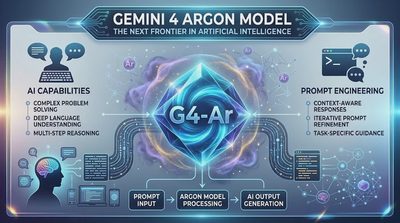
Remember when everyone was questioning Google's AI strategy?
Look at the lineup now:
Gemini 4 Argon — the first big signal.
Gemini 4 Carbon — frontier intelligence.
Gemini 4 Hydrogen — speed and efficiency.
Gemini 4 Krypton — a new checkpoint with some seriously impressive early outputs.
Honestly, this is the kind of comeback everyone wanted to see from Google. If these models deliver on their promises, the competition is going to have a serious problem.
And now, Gemini 4 Carbon has officially arrived.
Google's newest frontier model is available to developers through the Gemini API and Google AI Studio, bringing deeper reasoning, extended agentic workflows, and a massive unified token window to some of the hardest engineering and research tasks.
But what actually makes Carbon different from Argon? What are its specifications, how much does it cost, and how can you start using it in your own application?
I've gone through Google's official launch announcements and developer documentation to break down the technical details, access options, and first API steps. Let's see what Carbon can actually bring to your next project.
Table of Contents
1. What Is Gemini 4 Carbon?
2. Gemini 4 Carbon: Key Specifications
3. What Makes Carbon Different from Gemini 4 Argon?
4. How Much Does Gemini 4 Carbon Cost?
5. How to Use Gemini 4 Carbon in Google AI Studio
6. Build Your First Gemini 4 Carbon API Request with Python
7. Important Things to Know Before Using Carbon in Production
1. What Is Gemini 4 Carbon?
Gemini 4 Carbon is Google's latest frontier reasoning model, officially announced on October 28, 2026, and made broadly available to developers, enterprises, scientists, and consumers on November 10.
Its main purpose is not simply to answer questions faster. Google designed Carbon for difficult tasks that require sustained reasoning, repeated verification, and multiple steps before reaching a useful result.
Think about the difference between these two requests:
"Write a Python function that sorts a list."
"Investigate a race condition in a distributed payment system, identify the root cause, redesign the transaction locking strategy, and create tests for concurrent requests."
The second task requires much more than generating a code snippet. The model needs to understand the system, examine possible failure points, consider alternative approaches, and verify whether its proposed changes make sense.
That's the type of workload Google wants Carbon to handle.
Google highlights four major application areas:
Software engineering: Complex debugging, multi-package migrations, architectural redesign, and full-stack development.
Multimodal knowledge work: Understanding dense documents, spreadsheets, charts, diagrams, and other visual information to produce structured deliverables.
Scientific reasoning: Working through mathematical, physical, and biological research problems that require extended investigation.
Cybersecurity defense: Identifying software vulnerabilities, evaluating whether they can be exploited, and developing root-cause fixes.
One important distinction: Carbon's general public model and its specialized cybersecurity configuration are not interchangeable. The more permissive cybersecurity model is restricted to approved Fairwind Program access.
2. Gemini 4 Carbon: Key Specifications
If you're evaluating Carbon for an application, these are the technical details worth understanding first.
Specification | Gemini 4 Carbon |
|---|---|
Model ID |
|
Model family | Gemini 4 |
Context and output limit | 1,048,576 combined tokens |
Default thinking level | Medium |
Thinking levels | Low, Medium, High |
Standard synchronous output | Up to 65,536 tokens |
Extended output | Up to 1,048,576 tokens minus input tokens |
API availability | Gemini API paid tier |
Main use cases | Agentic coding, reasoning, research, multimodal knowledge work |
The 1-million-token limit is not just an input window
One detail developers should not overlook is how Gemini 4 handles its token budget.
Carbon uses a unified limit of 1,048,576 tokens across input and output. That total includes thinking tokens, function calls, and the final response.
In other words, you cannot send a million tokens of input and then expect another million tokens of output.
For example, if your request consumes 200,000 tokens, the remaining theoretical budget is 848,576 tokens.
There is another important distinction: the standard synchronous output limit is 65,536 tokens. Longer responses require the long-decode workflow, which uses continuation handling to extend generation.
This is particularly useful for large code-generation tasks, formal mathematical proofs, and other workloads that cannot reasonably fit into a short response.
Thinking levels: Low, Medium, and High
Carbon supports three thinking levels:
Low: A reasonable starting point for simpler tasks where you don't need extensive reasoning.
Medium: The default setting and a practical balance for general complex work.
High: Better suited to difficult reasoning, complex coding, and tasks that need more extensive investigation.
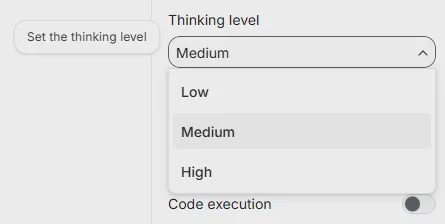
Higher thinking levels can consume more tokens. Remember that thinking tokens count toward the combined output budget, so setting a high reasoning level does not automatically mean you'll receive a longer final answer.
For most developers, I'd start with Medium and move to High only when the task genuinely benefits from deeper reasoning.
3. What Makes Carbon Different from Gemini 4 Argon?
If you've already been following Gemini 4 Argon, you might wonder why Google needs another frontier model.
The short answer is that Carbon and Argon target different levels of task complexity.
Google describes Argon as a strong choice for the majority of software engineering and knowledge-work tasks. Carbon is designed for more demanding problems that require deeper reasoning and longer verification loops.
Area | Gemini 4 Argon | Gemini 4 Carbon |
|---|---|---|
Everyday coding | Strong fit | Capable, but potentially more than needed |
Complex debugging | Capable | Primary target |
Long-running agent tasks | Supported | Specifically optimized |
Scientific discovery | Capable | Major focus |
Deep multimodal knowledge work | Supported | Major focus |
Reasoning effort | Lower for many workflows | Can spend more tokens exploring and verifying |
This is not a claim that Carbon should replace Argon everywhere.
In fact, using the most capable model for every request can be an expensive engineering decision. If your application mainly generates straightforward summaries, extracts fields, or writes simple code, a lighter model may be more economical.
Carbon becomes more interesting when the cost of an incorrect answer is high or when the task requires several rounds of investigation.
What do the benchmarks say?
Google reports several notable results from its launch evaluations:
#1 on CursorBench 4.0.
#1 on Perplexity's WANDR.
#1 on Zapier's AutomationBench.
#2 on the Multimodal Knowledge Agent benchmark.
Google also reports strong cybersecurity results, including 88.2% on SEC-bench Pro, 54.8% on ExploitGym, and 71.0% on CWE-bench.
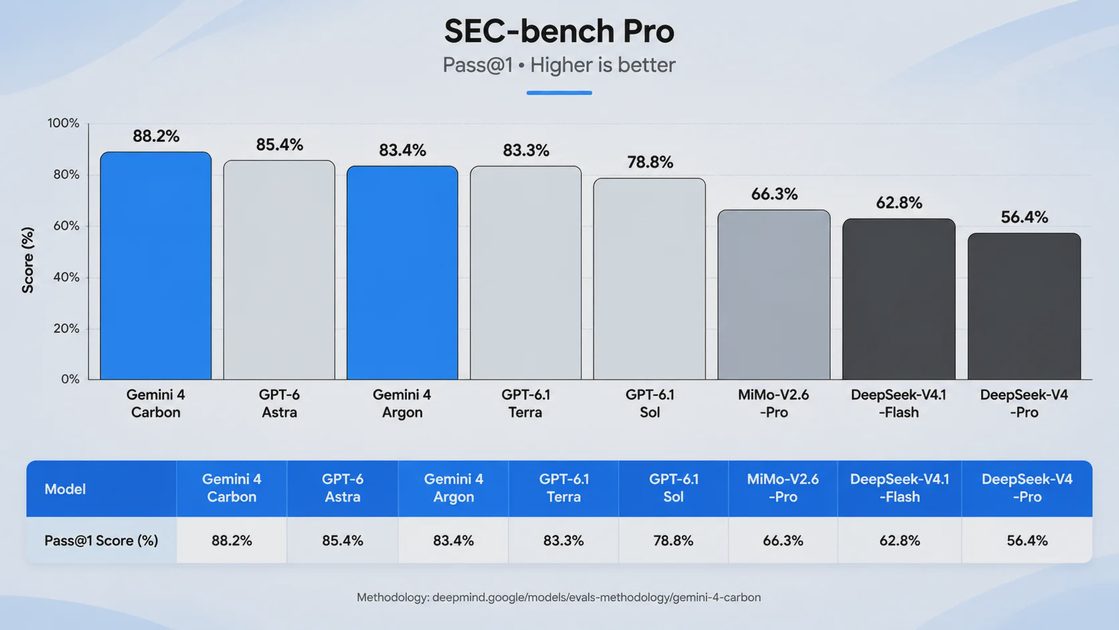
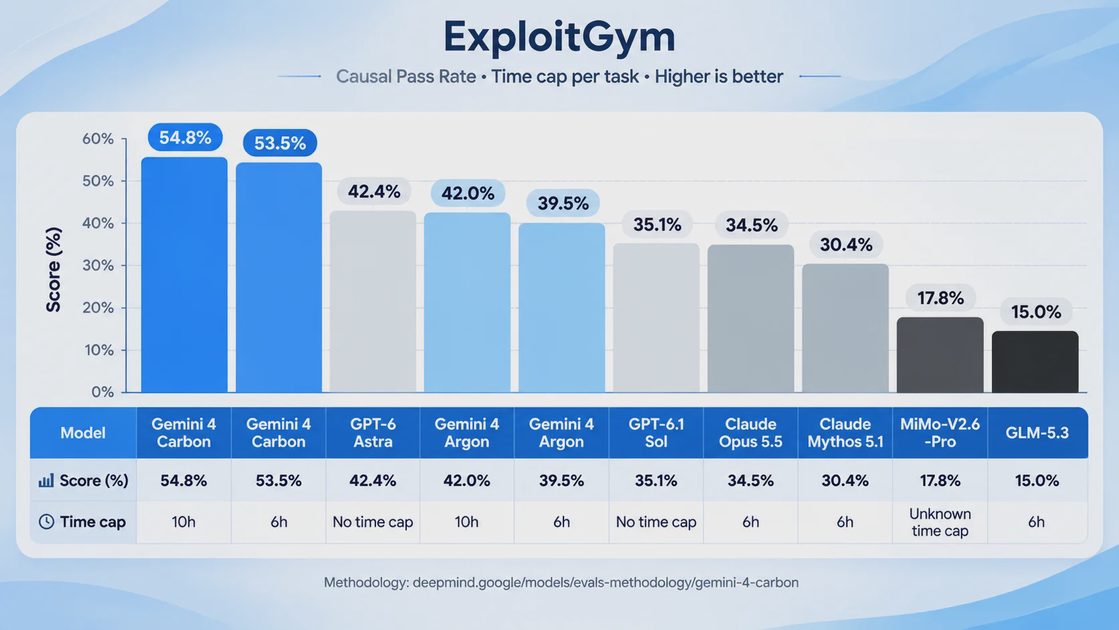
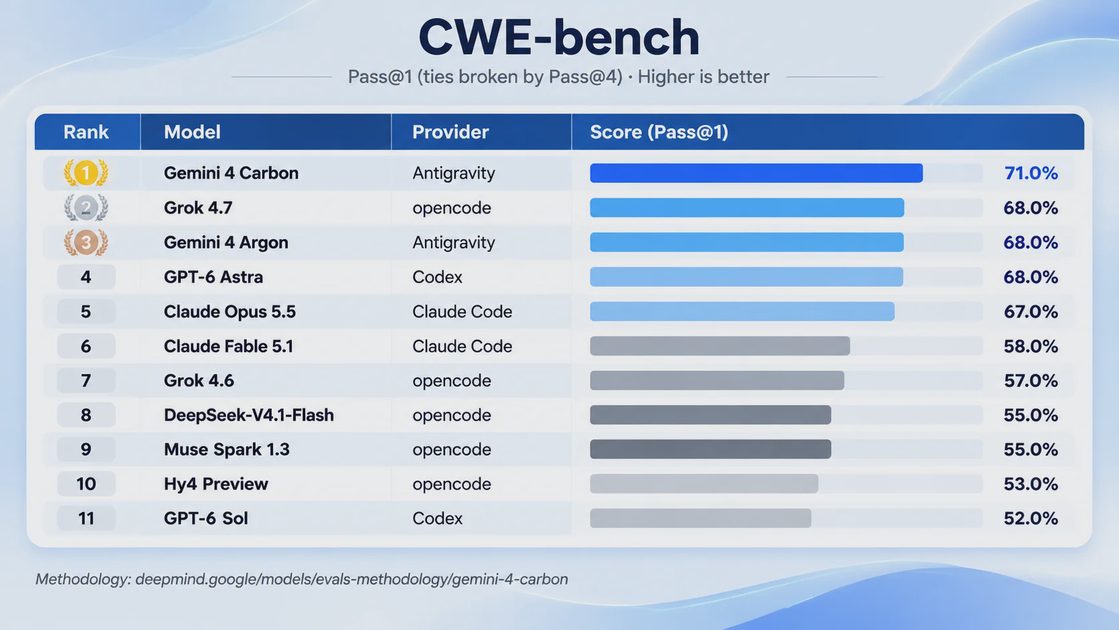
These results are encouraging, but benchmark rankings should not be treated as a guarantee of production performance. Different evaluations use different tasks, tools, scoring methods, and execution environments.
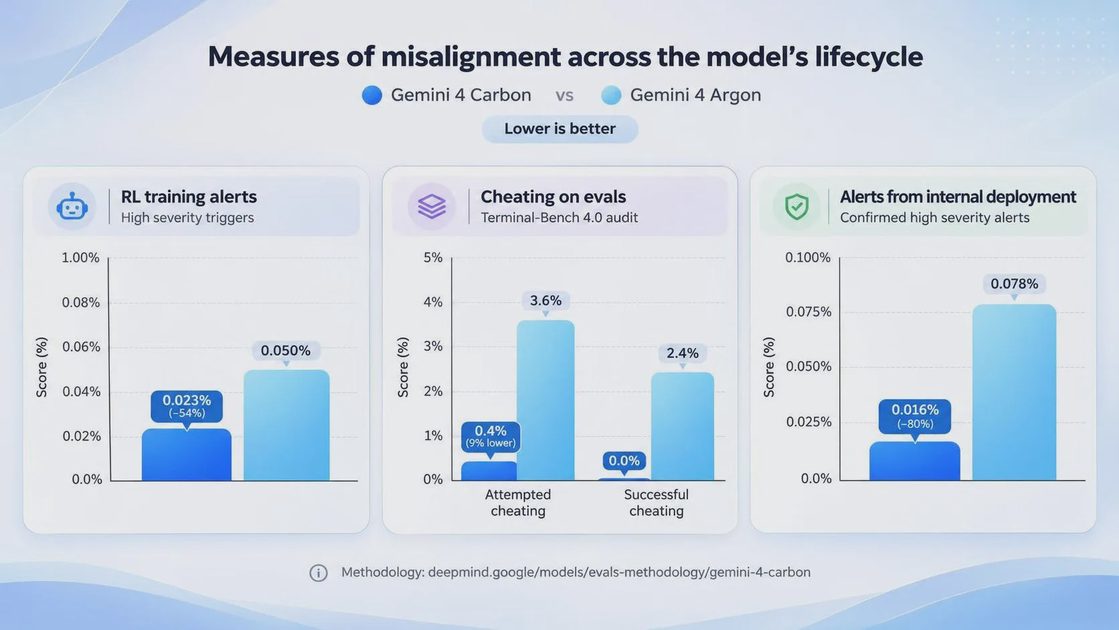
My takeaway is that Carbon deserves attention if you're building systems that need more than a single-turn answer. But I'd still evaluate it against your own workload before switching models.
4. How Much Does Gemini 4 Carbon Cost?
Pricing is especially important because Carbon is designed to spend more tokens on difficult tasks.
Google's introductory pricing is:
Token type | Introductory price | Regular price after Nov. 30, 2026 |
|---|---|---|
Input tokens | $2 per 1M | $4 per 1M |
Output tokens | $10 per 1M | $20 per 1M |
The introductory price is available through November 30, 2026. After that date, the regular rates apply.
Cached input tokens are also discounted under Google's published pricing terms.
Here's a simple example.
Suppose an application processes 1 million input tokens and generates 200,000 output tokens.
At introductory rates:
Input: 1 × $2 = $2
Output: 0.2 × $10 = $2
Estimated total: $4
At regular rates:
Input: 1 × $4 = $4
Output: 0.2 × $20 = $4
Estimated total: $8
This is a simplified calculation, not a complete production cost estimate. Actual billing depends on all billable tokens, including thinking tokens and applicable tool-related usage.
That last point matters. A model that reasons more deeply may use considerably more tokens than a simple text-generation workflow.
Don't evaluate Carbon only by its price per million tokens. Evaluate the total cost of completing a task successfully.
5. How to Use Gemini 4 Carbon in Google AI Studio
The easiest way to explore Carbon is through Google AI Studio.
You don't need to build a complete application just to test its behavior.
Here's a straightforward starting process.
Step 1: Open Google AI Studio
Go to: https://aistudio.google.com/
Sign in with your Google account.
Make sure you have access to the paid Gemini API tier. Carbon is not simply an unrestricted free-tier model.
Step 2: Open the Gemini 4 Carbon Playground
Open the model's Playground directly: https://aistudio.google.com/prompts/new_chat?model=gemini-4-carbon
This takes you to a chat environment configured for Gemini 4 Carbon.
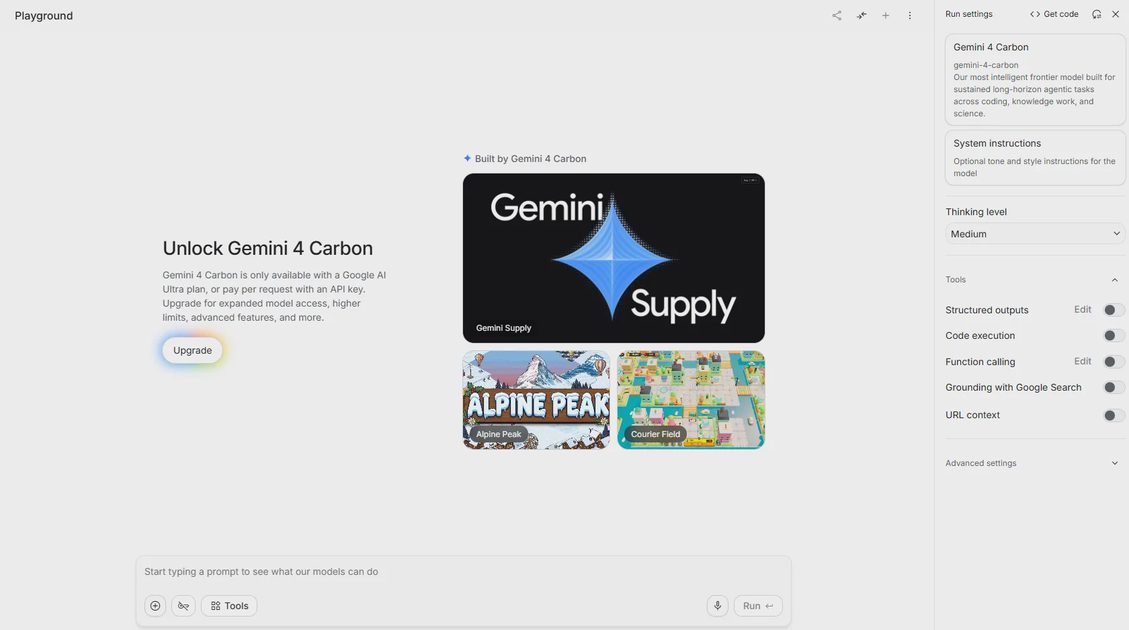
Step 3: Select the Model and Configure Thinking
Confirm that the selected model is gemini-4-carbon.
For your first experiment, leave thinking at Medium.
Once you have a baseline result, try the same task with Low and High. Compare the quality, token usage, and whether the additional reasoning actually improves the output.
Step 4: Give Carbon a Task That Requires Real Reasoning
Don't test a reasoning model with only "What is Python?"
Use a task that requires it to investigate a problem.
For example:
Review this Python service architecture. Identify potential race conditions, explain the root cause of each issue, propose a safer design, and provide a test plan that covers concurrent requests and retry behavior. Separate confirmed problems from potential risks.
This gives you a more meaningful way to evaluate the model.
You can also test document analysis, code review, research synthesis, and structured reporting.
Step 5: Compare the Results
Try the same prompt at different thinking levels.
Pay attention to:
Whether the model identifies the important issues.
Whether its proposed fixes are technically consistent.
Whether it explains assumptions.
Whether the output follows your requested format.
How much token usage increases.
The goal is not to find the setting that produces the longest answer. It's to find the setting that produces the most useful answer for the task.
6. Build Your First Gemini 4 Carbon API Request with Python
If you're ready to move beyond the Playground, you can call Carbon through the Gemini API.
Google's documentation provides examples using the Google Gen AI SDK and the Interactions API.
Step 1: Install the SDK
Open your terminal and run:
pip install --upgrade "google-genai>=2.34.0"The newer SDK version is important if you plan to use the Interactions API's automatic continuation support for long outputs.
Step 2: Create an API Key
Generate an API key through Google AI Studio.
Store it as an environment variable rather than hardcoding it into your application.
For macOS or Linux:
export GEMINI_API_KEY="YOUR_API_KEY"For Windows PowerShell:
$env:GEMINI_API_KEY="YOUR_API_KEY"Never commit your actual API key to a public GitHub repository.
Step 3: Send Your First Request
Create a Python file named carbon_test.py:
from google import genai

client = genai.Client()

interaction = client.interactions.create(
    model="gemini-4-carbon",
    input=(
        "Review a Python API endpoint that processes payment retries. "
        "Identify possible race conditions, explain the risks, "
        "and suggest a safer implementation."
    ),
    generation_config={
        "thinking_level": "medium"
    }
)

print(interaction.output_text)
Run it:
python carbon_test.pyThe SDK reads the API key from your environment variable, creates a client, and sends the request to Gemini 4 Carbon.
The important line is:
model="gemini-4-carbon"That's the model ID your application needs to reference.
Step 4: Try a More Complex Task
Once the basic request works, experiment with a higher reasoning level.
For example:
interaction = client.interactions.create(
    model="gemini-4-carbon",
    input=(
        "Analyze this distributed system design. "
        "Identify failure scenarios, propose architectural changes, "
        "and create a verification plan with edge cases."
    ),
    generation_config={
        "thinking_level": "high"
    }
)
For tasks requiring very long outputs, you can also use background execution and increase max_output_tokens.
One example from Google's documentation uses:
interaction = client.interactions.create(
    model="gemini-4-carbon",
    input="Write a detailed technical proof with all intermediate steps.",
    background=True,
    generation_config={
        "max_output_tokens": 262144,
        "thinking_level": "high"
    }
)
Background execution allows the server to handle long-decode continuation. For these requests, your application should also check the interaction status and collect the output from its completed model-output steps.
Don't start with a 262K-token budget for ordinary requests. Larger limits can increase costs substantially.
7. Important Things to Know Before Using Carbon in Production
Getting a successful API response is only the first step. Production integration requires a little more planning.
Upgrade Your SDK
For automatic continuation on the Interactions API, Google's current documentation specifies:
Python:
google-genai >= 2.34.0JavaScript/TypeScript:
@google/genai >= 2.32.0Go:
>= 1.77.0Java:
>= 1.80.0
Check the current documentation before upgrading an existing application, especially if it uses older Gemini APIs.
Revisit Your Token Budget
Gemini 4 uses a unified input-and-output token limit. Older applications that assume separate input and output budgets may need changes.
Also remember that thinking tokens consume part of the output budget.
Don't Assume Every Feature Is Available Everywhere
Google AI Studio and Gemini Enterprise Agent Platform have different setup requirements and access conditions.
For example, the enterprise documentation describes region selection, authentication through Google Cloud credentials or API keys, and restrictions for certain verified enterprise customers.
The specialized cybersecurity configuration is also subject to Fairwind Program access controls.
Check the access requirements for your chosen platform before designing your integration around a feature.
Test the Model Against Your Own Workload
Before moving a production workflow to Carbon, build a small evaluation set.
Include:
Typical requests.
Difficult edge cases.
Inputs that contain incomplete information.
Tasks where an incorrect answer would be expensive.
Requests that require structured output or tool use.
Measure completion quality, failure rates, token consumption, latency, and the amount of human correction required.
A higher benchmark score is interesting. A workflow that consistently produces better results at an acceptable cost is much more useful.
Final Thoughts: Carbon Is Interesting, but Your Workflow Is the Real Test
Gemini 4 Carbon is a meaningful addition to Google's model lineup. Its focus on long-running agent workflows, complex engineering tasks, multimodal knowledge work, and scientific reasoning makes it particularly interesting for developers building more ambitious AI applications.
But I wouldn't recommend replacing every existing model with Carbon.
Start with a specific problem that your current model struggles to solve. Try it in AI Studio, reproduce the task through the API, and compare the actual output and cost.
If Carbon can solve a difficult task more reliably without making your application unnecessarily expensive, that's a strong reason to consider it.
The model announcement is exciting. The engineering work begins when you put it inside a real system.
I tried it first. You can just copy.